Previously, I explained what a PLC is and how it controls a process. In that post, I used a ControlLogix PLC as an example, but I didn't talk about the other controller families that Rockwell Automation offers.
In this post, I'm going to walk you through Rockwell Automation's controller lineup. By the end of this post, you'll understand:
- The Micro800 family and who it's designed for,
- The Logix 5000 family, including CompactLogix and ControlLogix, and
- A few older controller platforms you might still run into in the field.
Let's get started by looking at how Rockwell Automation organizes its controller portfolio.
Rockwell Automation's Controller Portfolio
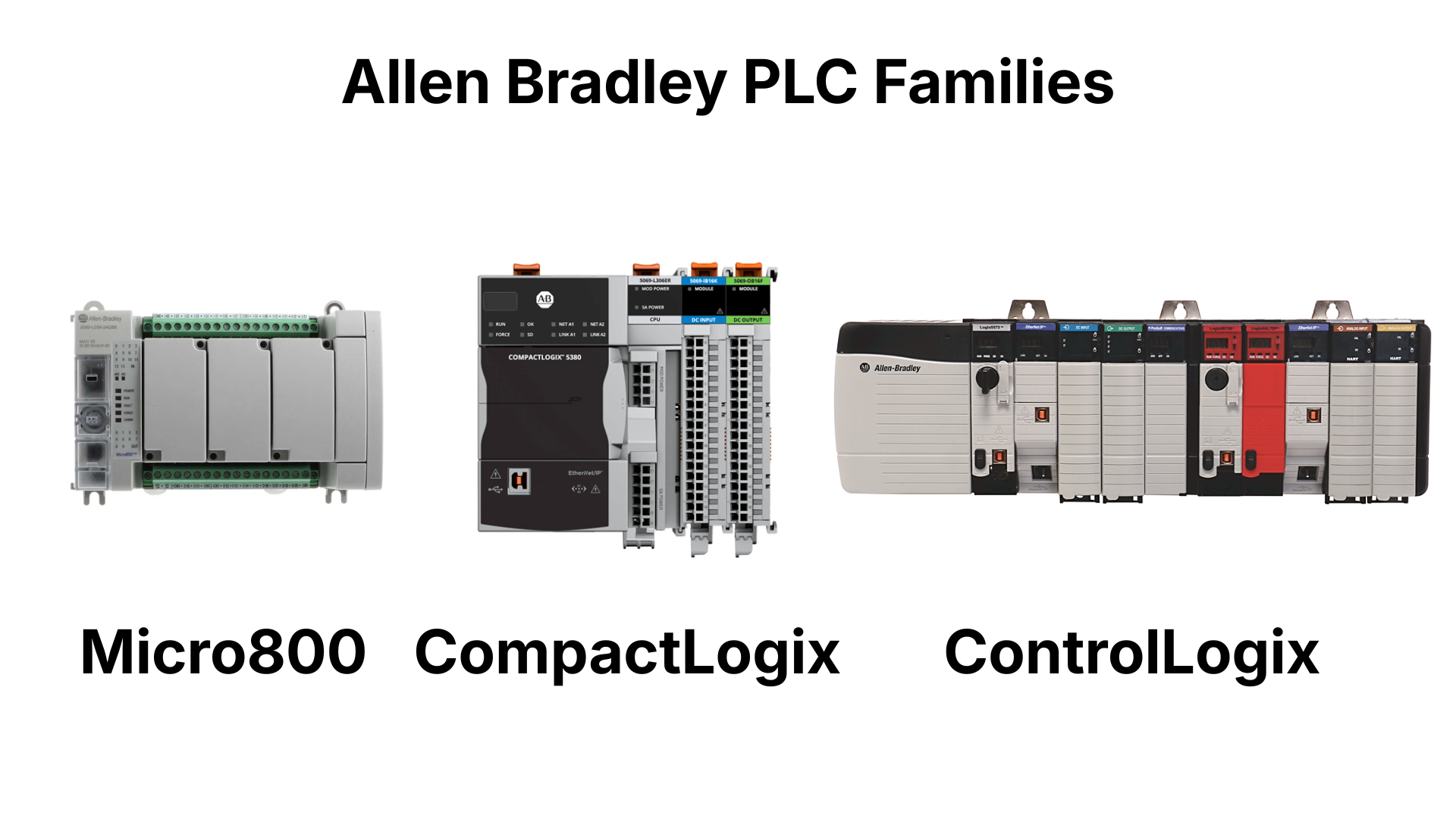
Rockwell Automation's controllers are grouped into a few families based on the size and complexity of the application.
The Micro800 family is positioned for simple machines and is marketed mostly to high-volume OEMs who are particularly price-conscious.
The Logix 5000 family is the heart of Rockwell Automation's Integrated Architecture platform. It includes CompactLogix controllers, which are typically used for standard machines, and ControlLogix controllers, which are used for large or complex applications.
There are also two platforms called AADvance and Trusted, used strictly for Process Safety applications like Safety Instrumented Systems. These aren't used for standard control, so I won't cover them in this post, but you'll often see them mentioned alongside the other families in Rockwell Automation literature.
Now that you have a high-level picture of the Rockwell Automation controller families, let's look at each family in more detail, starting with the Micro800 family.
The Micro800 Family
Micro800 controllers are designed for low-cost, standalone machines.
.png)
These are economical, small-size PLCs available in different form factors based on how many I/O points are built into the base unit. Every controller in the family shares the same programming environment, the same accessories, and the same plug-in modules, which lets a machine builder personalize a controller for a specific application without switching software.
Historically, Micro800 PLCs have been programmed with a piece of software called Connected Components Workbench, or CCW. However, in 2026 Rockwell Automation launched FactoryTalk Design Workbench which is the successor of Connected Components Workbench.
Plug-Ins and Expansion I/O
Plug-ins are small modules that add functionality to a Micro800 controller without changing its footprint or its price. A plug-in might add extra I/O, isolated analog I/O, a communication port, or backup memory. The idea is that you only buy as much control as the application actually needs.
Plug-ins work with the Micro820, Micro830, Micro850, and Micro870. They don't work with the Micro810, which I'll explain in a moment.
.png)
If an application needs more I/O than plug-in modules can provide, the Micro850 and Micro870 controllers can also use 2085 expansion I/O. These modules snap onto the right side of the controller to form one larger unit. Expansion I/O is higher density and more capable than plug-in I/O, but it's also more expensive, and it's only available for the Micro850 and Micro870 controllers.
.png)
The Micro810
The Micro810 doesn't follow the same rules as the rest of the Micro800 family.
You can think of the Micro810 as a smart relay with the programming capability of a micro PLC. It has high-current relay outputs built right in, and it's programmed using the same CCW software as the rest of the family. Because of this design, it doesn't use plug-ins for I/O or communication the way the Micro820, Micro830, and Micro850 do.
.png)
Micro810 PLCs support an optional plug-in LCD with buttons. This LCD lets you monitor inputs and outputs and program the controller locally.
.png)
Now that you know the Micro800 family, let's move up to the Logix 5000 family.
The Logix 5000 Family
The Logix 5000 family sits above the Micro800 and is the core of Rockwell Automation's Integrated Architecture platform. This is a tightly integrated portfolio of controllers, I/O, drives, and visualization products designed to work together.
There are four values that define the Integrated Architecture:
- Multi-discipline control, the ability to run multiple control disciplines in a single controller instead of needing separate controllers and software for each one,
- Scalability, meaning Logix can be used for systems of nearly any size within the same design environment,
- EtherNet/IP, a real-time control network built on standard, unmodified Ethernet, which makes it easy to connect automation systems to IT networks, and
- Real-time information, the ability to turn data into useful information right where that data is created.
All Logix 5000 controllers are programmed using Logix Designer, which is part of the Studio 5000 design environment. You may also hear this software called RSLogix 5000, which is the name of an earlier version of the software.
Logix 5000 controllers come in two families: CompactLogix and ControlLogix.
CompactLogix
.png)
CompactLogix is targeted at small to medium-sized applications.
CompactLogix controllers are rackless, meaning they don't use a chassis. The power supply and the EtherNet/IP port are built right into the controller, which gives CompactLogix a smaller footprint than ControlLogix. Programs can be downloaded over Ethernet or locally through a USB port, and all controllers include an SD card slot that can back up a program or quickly load it onto a replacement controller.
CompactLogix catalog numbers start with either 1769, 5069, or 5034 depending on the type of CompactLogix.
Depending on the model, a CompactLogix controller uses one of a few different local I/O platforms, including 1734 Point I/O, 1769 Compact I/O, 5069 Compact 5000 I/O, or 5034 PointMax I/O. Many CompactLogix models are also available as a Compact GuardLogix version, which adds integrated safety control to the controller.
ControlLogix
.png)
ControlLogix is positioned for larger, more complex applications.
Unlike CompactLogix, ControlLogix is chassis-based. The power supply, controller, communication modules, and I/O modules are installed into a chassis that provides power and comms to the modules.
Most products designed for a ControlLogix chassis carry a catalog number that starts with 1756, including the controllers, communication modules, and local I/O. ControlLogix also supports more specialty modules than CompactLogix, including modules for redundancy and advanced process control.
GuardLogix/Compact GuardLogix
.png)
Guard means a safety version of the controller.
A GuardLogix controller does everything an equivalent ControlLogix controller does, plus it adds safety-rated control. For example, it can stop a machine safely based on the status of a light curtain.
In general, you'll see CompactLogix show up more often on OEM-built machines and ControlLogix show up more often in large end-user facilities, though that's an oversimplification, and there are plenty of counterexamples.
Now that you've covered the lead controller products, let's look at a few older platforms you might still run into.
Older Controller Platforms
These platforms are either obsolete or on their way there, but they still have a large install base, so it's worth knowing what they are.
.png)
The MicroLogix was the previous generation of micro controller and is still popular with OEMs. Some models have been discontinued, while others are still sold and supported.
.png)
MicroLogix shares its programming software with the SLC, short for Small Logic Controller. You may also hear it called "Slick." The SLC was designed for applications similar to what CompactLogix covers today.
.png)
The PLC-5 was introduced in the mid-1980s and was only recently made obsolete. It's one of the most successful products in automation history and helped establish Allen-Bradley as a leading PLC brand, so you'll still find it running in plenty of facilities today.
Wrap Up
In this post, I introduced you to Rockwell Automation's controller families: the Micro800 for simple, cost-sensitive machines, CompactLogix and ControlLogix for standard to large applications, and a few older platforms still running out in the field.
Learn PLC Programming in your browser
Learn PLC programming by building projects in your browser - no hardware or software required.
Then €29.97/month · Cancel any time