FactoryTalk Logix Echo is Rockwell Automation's next generation controller emulator. It is the successor to Studio 5000 Logix Emulate which was, frankly, a bad product. In this post, I'll walk you through the key features of Logix Echo and explain the key differences between working with FactoryTalk Logix Echo, Studio 5000 Logix Emulate, and a physical PLC. All of this information will help you understand what you can and can't do with FactoryTalk Logix Echo so that you are ready to use it for virtual testing.
Let's start by looking at some of the key features of FactoryTalk Logix Echo.
Key Features
Controller Emulation
Logix Echo is Rockwell Automation's latest controller emulation product and it is used to emulate Rockwell Automation's latest controllers. When it was first launched, FactoryTalk Logix Echo was capable of emulating ControlLogix 5580 controllers. Subsequent released added support for CompactLogix 5380 controllers, ControlLogix 5590 controllers, and all safety variations of those controllers.
In contrast, Studio 5000 Logix Emulate could only emulate ControlLogix 5570 controllers and, as we'll see in the next point, there were limitations to how much of a project could actually be emulated.
No Project Changes
You can download the exact same project to a Logix Echo emulated PLC that you would download to a physical PLC. All programming languages and instructions are supported and the I/O configuration can be maintained.
This is a huge improvement over FactoryTalk Logix Emulate where you had to:
- Change the controller in the project to a special emulated controller,
- Remove all of the modules from the I/O configuration,
- Remove unsupported instructions like MSG instructions
Once its downloaded, the complete project is executed on the Logix Echo controller including safety and motion logic. For testing motion applications, Logix Echo provides CIP motion drive connection emulation as well as low fidelity CIP motion axis and drive simulation for Kinetix and PowerFlex CIP motion drives as well as 5370 iTRAK products.
Ethernet Port Emulation
Modern controllers include an ethernet port which is used for communication on an industrial network and in Logix Echo, a controller's ethernet port is emulated. You can use this emulated ethernet port to test data exchange between controllers and other devices using produced and consumed tags and Message instructions.
Emulated ControlLogix controllers can also communicate over an emulated backplane.
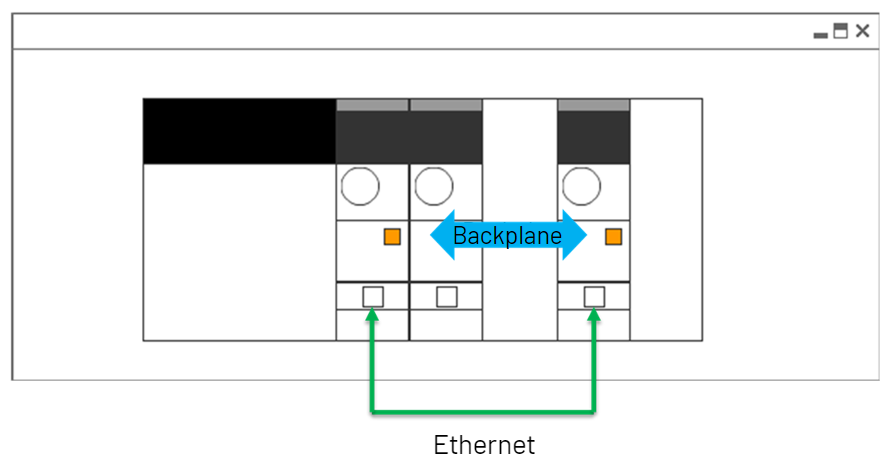
The emulated ethernet port enables more than controller to controller communications. Since Class 3 EtherNet/IP communication is supported, Logix Echo can communicate with a physical or emulated HMI to test the visualization for a product or perform operator training without any hardware. This can be done on a local or remote computer.
.png)
This type of communication wasn't possible with FactoryTalk Logix Echo since ControlLogix 5570 controllers didn't have embedded ethernet ports and there was no option to emulate communication adapters.
Virtual SD Card
Logix Echo uses virtual SD cards to store information on your computer.
When you create a new controller in Logix Echo, a virtual SD card is automatically created for the controller. This virtual SD card is a folder on your computer that can be used like the SD card in a physical PLC. You can access the SD card for a controller by right-clicking on the controller and selecting View SD Card.
.png)
This SD card can be used to backup and restore projects and to log data just like a physical SD card.
One thing to note is that this virtual SD card is not exactly the same as the physical SD card in a controller. The two key differences are that the firmware is not stored on the virtual SD card and the contents of the virtual SD card are not encrypted.
Software Development Kit (SDK)
Like many modern software packages, Logix Echo includes a Software Development Kit (SDK) that let's other applications interact with it programmatically. What this means practically is the Logix Echo can be connected to digital twins, process simulators, and operator training interfaces for testing and training. It also means that, when paired with the Logix Designer SDK, you can use the Logix Echo SDK to perform automated testing on a project.
The SDK is made up of documentation, sample code, and a NuGet package that allows you to access the Application Programming Interfaces (APIs) for Logix Echo. Logix Echo ships with two APIs:
- The Service API is used to manage the system and perform functions that can be done from the Logix Echo dashboard
- The Controller API is used to control execution, scale time, and access tags in an emulated controller
Originally, these APIs were available for C++ applications but later releases of the SDK introduced support for C# and Python applications. If you have the SDK, you can check out the sample code at these locations on your computer:
- C:\Users\Public\Documents\FactoryTalkLogix Echo\SDK\Dotnet\Examples (for C# applications)
- C:\Users\Public\Documents\FactoryTalkLogix Echo\SDK\Python\Examples (for Python applications)
I was pleasantly surprised by how clear, thorough, and easy to understand the sample code was. When paired with an AI tool like Claude or ChatGPT, it is very easy to build applications that interact with Logix Echo even if you are not a software developer.
.png)
Snapshots
Finally, Logix Echo supports the concept of snapshots.
A snapshot is a recording of a controller's state at a specific point in time that includes the controller's time, tag data, and execution context. The controller can be restored to the snapshot state at any point in the future.
Snapshots are very useful for training and testing. For training, snapshots let you easily return to a scenario that is difficult or time consuming to set up. For testing, snapshots let you return to a point where a bug occurred to verify that the issue has been resolved.
Now that we have covered the key features of Echo, let's see how it compares to FactoryTalk Logix Emulate and a physical controller.
Echo versus Emulate
The table here shows the differences between Logix Echo and Studio 5000 Logix Emulate. As you can see, Logix Echo supports a lot more features than its predecessor. One thing to note is that neither FactoryTalk Logix nor Studio 5000 Logix Emulate are designed to be virtual PLCs or soft PLCs and they cannot communicate with real I/O.
Echo vs PLC
Now that we know the difference between a controller emulated in Logix Echo and Logix Emulate, let's look at the difference between a controller emulated in Logix Echo and a physical controller.
The key takeaway from this table is that a controller emulated in Logix Echo is not intended to be a soft PLC or a virtual PLC. For that reason, it cannot interact with hardware.
This means that a Logix Echo controller cannot:
- Connect to physical I/O devices,
- Connect motion axes to physical drives,
- Exchange produced/consumed tags with physical controllers,
- Use license-based source protection,
- Emulate a redundant system with primary and secondary controllers
The table below shows a more detailed breakdown of the differences between a Logix Echo controller and a physical controller
Controller Performance
For testing large applications, it’s good to understand the performance limits of a Logix Echo chassis.
Maximum Achievable Specifications:
- Class 1 Produced/Consumed messages between emulators: 20,000 PPS (packets per second)
- Class 1 chassis total: 160,000 PPS.
- Class 3: 700 messages/second.
- Class 3 chassis total: 3,700 messages/second.
- Minimum RPI: 10ms
Note that since Logix Echo runs as a normal user program, it can and will be interrupted by other Windows services and processes. This can adversely impact performance.
Despite 99.9% of messages getting successfully transmitted/received, CIP connections will occasionally timeout due to interrupts from other Windows services.
Wrap Up
FactoryTalk Logix Echo is Rockwell Automation’s next generation of controller emulator and it offers a ton of improvements over the current solution, Studio 5000 Logix Emulate.
For most users, the most important difference is that FactoryTalk Logix Echo allows you to emulate ControlLogix 5580, ControlLogix 5590, and CompactLogix 5380 controllers and allows you to download a project without modifying the hardware configuration.
The next most important feature is the emulation of the backplane and the controller’s ethernet port. This allows you to configure produced and consumed tags and Message instructions to exchange data between controllers. It also allows you to connect an emulated controller to an HMI or other software systems using Message instructions.
I'm a huge fan of Logix Echo and, even though some people grumble about the price tag, I think its worth every penny since it enables real, high-fidelity virtual testing of Logix 5000 based control systems.
Learn PLC Programming in your browser
Learn PLC programming by building projects in your browser - no hardware or software required.
Then €29.97/month · Cancel any time